Microsoft have updated their Raw Image Extension with support for Canon's newer .CR3 images*.
This extension works in both File Explorer and Directory Opus, for thumbnail and viewer support.
While Opus comes with its own Raw Camera plugin, you may find Microsoft's codec works better for some camera models (or vice versa).
More detail here on the forum:
Viewer/VFS Plugins: Raw Image Extension (Microsoft)
Note that Windows 10 (1903) or above is required.
* Edit: It turns out the CR3 update is only for Windows Insider build users at the moment, but will presumably be released for everyone in time.
Showing posts with label plugins. Show all posts
Showing posts with label plugins. Show all posts
21 April 2020
Raw Image Extension (Microsoft)

1 April 2020
Markdown and SVG viewers
If you work with Markdown documents (.md files) or SVG images, you may find these new viewers useful.
Microsoft have updated their PowerToys for Windows 10 with viewers for both formats.
Details, links and screenshots of what they look like within Directory Opus can be found here:
For Markdown, there is also a second, alternative viewer linked at the bottom of the post, in case it works better for you.
For SVG, you can also preview .SVG files via Internet Explorer's built-in support, which Opus will use by default in the viewer pane if nothing else is installed.
14 February 2014
Quick video: Scripting Opus 11 to be a music launcher
The new scripting capabilities in Directory Opus 11 open up lots of new possibilities, and there are already a few scripts at the forum from people who are trying the public beta.
One of the scripts you can find there is my one to turn Opus into a better music launcher (for people who still listen to albums :)).
To help explain this script, and as a quick demonstration of something you can do with scripting in Opus 11, I made this short video:
The forum post about the script has more details.
Here are some other Opus 11 scripts at the forum:
- "Smart" front end for Beyond Compare
- Script to toggle automatic folder size calculation
- Open calc.exe in a specific mode via menu or arg
- Dynamic SWITCHPATH v2.1
27 August 2011
Universal Graphics Viewer Plugin
A new Directory Opus viewer and thumbnail plugin has been released by ZwickySoft, adding support for additional image formats.
The plugin is based on the GFL SDK, a component for decoding various images which was written by Pierre E. Gougelet, the creator of the
The plugin adds support for the 'HDR' format, which I know a several people have requested over the years. For a list of the (many) other formats, and further discussion of the plugin, see this thread at the Opus forums:
9 August 2011
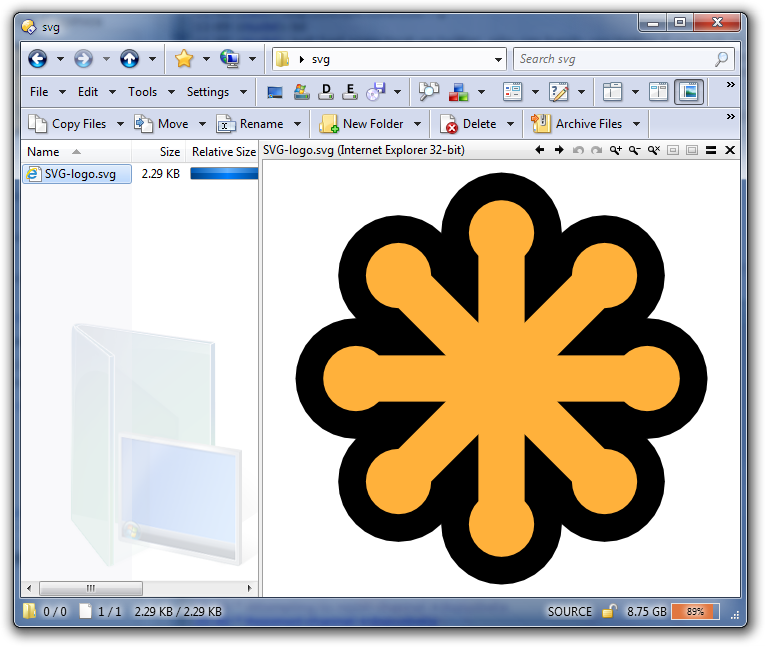
Viewing SVG files in the Opus preview pane
If you have Internet Explorer 9 or above, you can view SVG files in the Opus viewer pane.
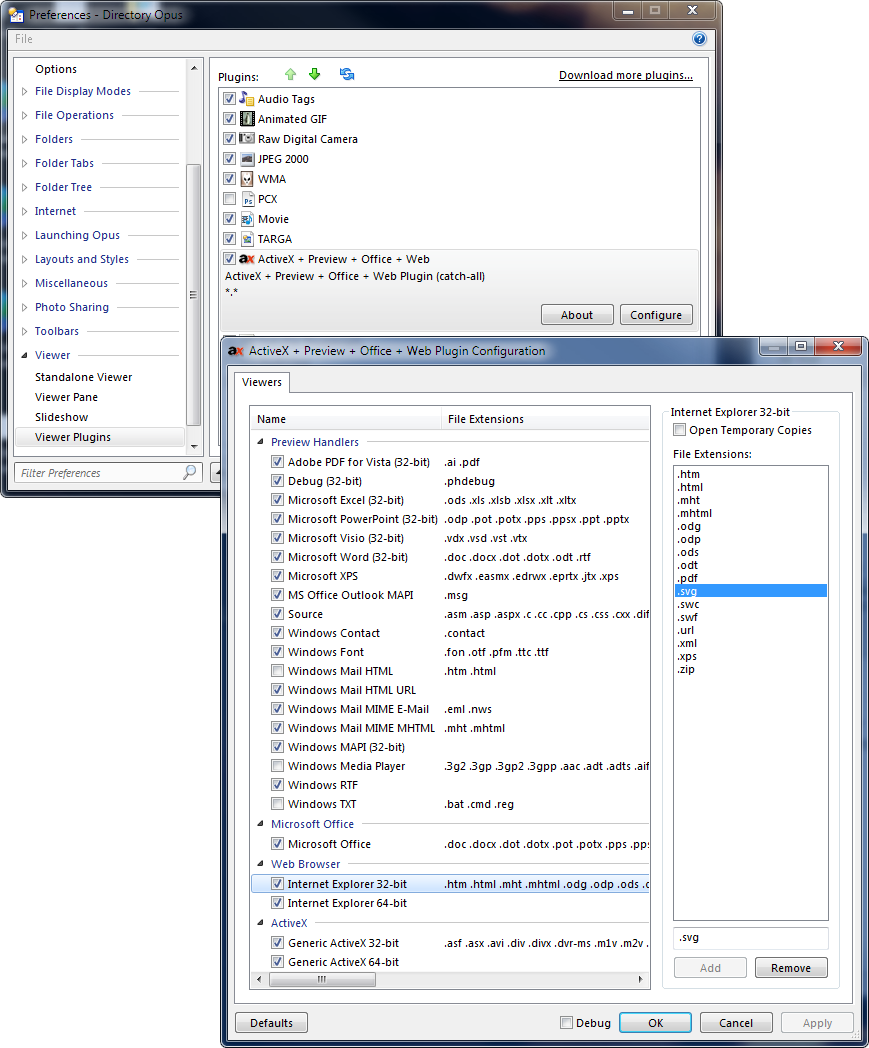
To do this, open the Opus ActiveX plugin configuration, select the "Internet Explorer" line near the bottom, then add .SVG to the list on the right.
(If you're on 64-bit Windows, you have the choice of using 32-bit or 64-bit IE. With current versions of IE, the 32-bit version is the best one to choose.)
Note that this only affects the viewer, not thumbnails. There may be thumbnailers for SVG out there, though.
6 June 2011
Delphi Source-Code preview handler
Peter Panino, over at the Resource Centre forums, discovered this preview handler that enables Delphi programmers to view their source-code with syntax highlighting:
http://www.delphifeeds.com/go/s/80512
Although it is written for Explorer it reportedly works great in Opus as well.
(If you use other programming languages instead of or as well as Delphi, there is a similar preview handler for many other languages.)
XP-style icons for Directory Opus 10
Cris van Minnen, who made Opus 10's default Vista/Win7-style toolbar icons, has released an alternative version of his icons in the Windows XP style.
This is a drop-in replacement for all 500 standard icons; 250 icons in large (32x32) and small (22x22). Your toolbars will automatically use the icons after installing them.
(Opus 10 also shipped with an updated version of the XP-style icons Trevor Morris originally made for Opus 9, so people who want XP-style icons are now spoiled for choice.)
You can see some of the small (22x22) icons below. For a preview of all the images, and to download the set, see Cris's post at the Resource Centre.
To install the set, download the zip file and extract the .dis file from inside it, then go to Preferences / Toolbars / Icons in Opus, click the Import button (shown below) and choose the .dis file. Then move it to the top of the list, so it takes priority over the other icon-sets you have installed.
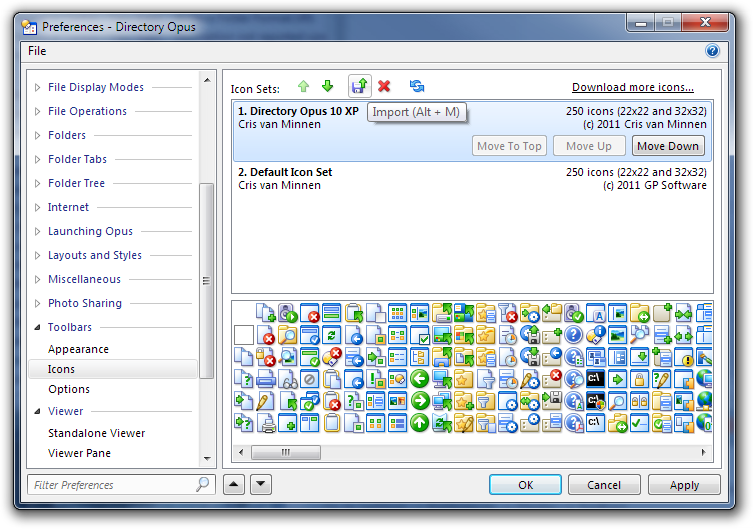
Note that each additional icon-set will slightly increase start time and memory usage. If you decide not to use a set after installing it then you can delete it via the Preferences window shown above. (The default set is built into the program and cannot be deleted.)
11 November 2010
Thumbnail plugin for Adobe Illustrator and EPS files
A new plugin has been released which gives Directory Opus the ability to display thumbnails of Adobe Illustrator (.ai) and EPS files.
This is a third-party plugin made by Ardfry Imaging and it requires their PSD Codec to work.
(While the plugin itself is free, the codec it depends on is US$19.95. There is a trial version so you can test it out. It also adds AI, EPS and Photoshop (PSD) thumbnails to Explorer, File-Open dialogs, etc. If you're wondering why it doesn't add PSD thumbnails to Opus as well it's just because Opus already understands PSD by itself.)
The plugin supports both 32-bit and 64-bit versions of Opus and Windows Vista/7. (The plugin doesn't support Windows XP.)
Head over to Ardfry's page for more information, download links, and some screenshots:
http://www.ardfry.com/psd-codec/view-eps-ai-thumbnails-in-Directory-Opus.html
It's great to see this plugin as I know several people on the Opus forum have requested something like it. Thanks to Ardfry!
24 September 2010
Quick View Plus and Opus
Quick View Plus (QVP) is a product which can view hundreds of file formats without the need for any additional software. For example, it can display Microsoft Word or Corel Word Perfect documents without having either program installed.
Quick View Plus 11 includes a preview handler that works within Directory Opus (and newer versions of Windows Explorer and Outlook).
Simply installing Quick View Plus 11 Standard (or above) will add its viewing abilities to Directory Opus if you are on Windows Vista, Windows 7 or above.
Notes & Caveats (correct at the time of writing, September 2010):
- Windows XP: Quick View Plus 11 does not install its preview handler on Windows XP, although it may do if you have Outlook 2007 installed (this has not been tested).
- 64-bit: Avantstar, who make Quick View Plus, do not officially support using it on 64-bit versions of Windows; however, from brief testing it appears to work fine.
- QVP editions: Quick View Plus 11 comes in two editions: Standard and Professional. The Standard edition is all you need if you just wish to view files within Directory Opus.
- QVP Trial version: The current Quick View Plus trial version does not correctly install its preview handler, meaning it will not work within Directory Opus. Avantstar are aware and will hopefully fix this in the future. The problem does not affect the full version of Quick View Plus. You can still use the trial version's standalone QVP application to test how well it views certain files.
(Thanks to Michael Kenward, Jon Potter and Avantstar themselves for their help discovering the info above. Thanks also to Ron Hirsch whose quest for a way to view Word Perfect files in 64-bit Opus led us here.)
18 March 2010
Updated: Interactive list of Opus Plugins & Media Capabilities
The Interactive list of Opus Plugins & Media Capabilities has been updated so that it is easier to find out if and how Opus can be used to view different types of files.
The list is now split into more categories and now includes several preview handlers and ActiveX controls which work within Opus, in addition to all the native Opus plugins and built-in features.
(The screenshot above is of the old version, just for illustration.)
Syntax coloured source-code viewer
Programmers who wish to view source code with syntax colouring should check out this preview handler:
http://www.smartftp.com/client/addons/sourcepreview
(This discovery is thanks to spiralx at the Opus forums.)
The preview handler was written for SmartFTP and Windows Explorer but it works great in Directory Opus as well. Just install it and you're done.
It works with both 32-bit and 64-bit, unlike the old Source Code Viewer Plugin.

Supported extensions/types:
- ActionScript (.as, .mx)
- ASP (.asp)
- ASPX (.aspx)
- AutoIt (.au3)
- Bash (.sh, .bsh)
- Batch (.bat, .cmd)
- Caml (.ml, .mli, .sml, .thy)
- C (.c)
- C++ (.cpp, .cxx, .cc, .h, .hxx, .rgs)
- C# (.cs)
- CSS (.css)
- Diff (.diff, .patch)
- Fortran (.f, .for, .f90, .f95, .f2k)
- Ini (.ini, .inf, .reg, .url)
- Inno Setup (.iss)
- Java (.java)
- JavaScript (.js)
- Lisp (.lsp, .lisp)
- Makefile (.mak)
- Matlab (.m)
- NFO (.nfo)
- NSIS (.nsi, .nsh)
- Pascal (.pas, .inc)
- Perl (.pl, .pm, .plx)
- PHP (.php, .php3, .phtml)
- Python (.py, .pyw)
- Resource (.rc)
- Smalltalk (.st)
- TeX (.tex)
- SQL (.sql)
- VB (.vb)
- VBScript (.vbs)
- XML (.xml, .xsd, .xsml, xsl, .kml)
7 November 2009
DirectDraw Surface viewer 64-bit version
A 64-bit version of the DirectDraw Surface (DDS) viewer plugin has been posted to the forum. (There 32-bit version is still there too, of course.)
You can download it via this thread:
28 May 2009
Interactive list of Opus Plugins & Media Capabilities
Interactive list of Opus Plugins & Media Capabilities
I've made an interactive list that helps you find which viewers (etc.) are bundled with Opus and which add-ons are available to make Opus do more.
The list includes several plugins/features that have not been mentioned here or at the forum. Screenshots are included, where useful, to give you an idea of how things are before you install anything.
You can filter the list to show just what interests you. For example, you can make it show only plugins which support 64-bit & USB mode, and don't come bundled with Opus, so that you don't waste time looking at things you already have or cannot use.
(Filtering requires Javascript. Without Javascript you'll get a static list with all of the information at once. By default much of the information is hidden so play with the filter to see the other details.)
Maybe you'll discover something new. Hope it's useful!
http://www.pretentiousname.com/opus_plugin_list/index.html
18 April 2009
CSV Chart Plugin (32-bit only)
User tomkupitz has posted an alternative CSV viewer plugin over at the forums.
This one displays numeric CSV data as a graph.
See his post for the download and screenshot links.
(This plugin is actually a few weeks old. I forgot to mention it here before.)
31 March 2009
Raw Digital Camera plugin update
I've posted a "preview" version of the new Raw Digital Camera plugin which adds support for 64-bit Windows, more camera formats and USB mode.
See my post about it over at the Resource Centre for more details and download links.
The plugin is currently in an early stage. In particular, everything is hardcoded (no configuration) and it always extracts the quick embedded preview images rather than doing a full (slow) high-quality decode. Those things will be improved later.
I figure a lot of people have been waiting patiently for this version, with many unable to use the old version at all, so it's worth mentioning now even though it's a work-in-progress.
I probably won't mention the new Raw plugin again on this blog until a proper release is ready. I'll post more frequent updates and preview builds in the forum thread, so keep an eye on that if you want to be on the cutting edge. Otherwise just wait and you'll find a nice new Raw plugin in a future Opus release in the not-too-distant future.
22 February 2009
Heads-up: dopus_fileinfo crashes and solution
Update: A workaround for this problem is included in Opus 9.1.1.8. See above.
Please see Heads-up: dopus_fileinfo crashes and solution if you're using the new CSV/RTF/Font/Postscript plugins and have found Opus crashes sometimes.
Hopefully the plugins will be easy to fix but I figure the mysterious crash may be causing problems for some people so it's worth giving everyone a heads-up on how to avoid it for now.
5 February 2009
CSV/PS/Font/RTF plugins updated
There are new updates for Dinkelhopper's plugins: CSV, PostScript, Font viewers and RTF editor.
The updates fix problems when multiple copies of the same plugin were open at once and add some new features like auto-save in the RTF editor plugin.
To get the new versions head on over to the plugins area of the Resource Centre.
Enjoy! And, of course, thanks to Dinkelhopper for the hard work!
26 January 2009
New plugin: RTF Viewer/Editor
Dinkelhopper has released another new plugin for Opus. This one lets you view and edit Rich Text Format files:
As with Dinkelhopper's other plugins, this one is for 32-bit users only.
(They are 32-bit only because they're written using the Delphi programming language which doesn't yet support 64-bit. Unfortunately, working around the problem with Delphi plugins and 64-bit would be quite complicated. I read that the new owners of Delphi plan to introduce 64-bit support later this year, however.)
Dinkelhopper's other plugins have also had a few updates since they were mentioned on this blog a few days ago. Keep an eye on their respective forum threads if you want to stay up to date with them.
As with when my MayaIFF plugin was new, it's normal for there to be a bunch of small updates for new plugins as people try different files on them and discover issues. I'm assuming people reading this blog prefer the traffic to be minimal (else they'd be reading the forum instead) so I won't post about every update until things settle down.
20 January 2009
New Opus plugins: Font, Postscript and CSV viewers
Dinkelhopper has posted three new Opus viewer plugins to the Resource Centre:
64-bit users should note that these plugins are 32-bit only, at least for now.
If you need alternatives that work with 64-bit:
CSV can be shown through the ActiveX plugin if you have Excel installed. (May also work with OpenOffice.org instead of Excel.)
Update: Not sure where my head was at when I wrote this... I don't think using ActiveX/Excel for CSV works very well as, from memory, you get an annoying format conversion dialog when you open the files. That would be why I didn't include .CSV in the default config of the ActiveX plugin.Postscript should be visible in the ActiveX plugin if you have Ghostscript installed and add the appropriate file extensions to the plugin:
The Ghostscript installer includes a postscript viewer for Internet Explorer and the ActiveX + Preview + Office + Web plugin for Opus can be configured to take advantage of that. Go to Preferences - Plugins - Viewer Plugins, select the ActiveX + Preview + Office + Web plugin, click Configure, then add the .ps and .eps extensions under the Internet Explorer (32-bit) section. Those file extensions will then be displayed in the Opus viewer pane via IE.
Update: Turns out this is incorrect. Ghostview does not provide a viewer that works in Internet Explorer, despite its webpage suggesting it does.- Fonts can be viewed via the Font preview handler which comes installed with Vista. (This is via the ActiveX plugin as well but doesn't require any configuration to enable.)
9 October 2008
ActiveX Plugin 3.1.0.7
An update to the ActiveX plugin, version 3.1.0.7, can be downloaded from its page.
There's only one small change but it might be important to you if people send you Office 2007 documents and you're using an earlier version.
Changes in v3.1.0.7 (9/October/2008):
- Requires Directory Opus 9.1.1.3 or above.
- You can now view Office 2007 documents if you have Office 2000, Office XP or Office 2003 and have installed the Office Compatibility Pack.
- Note: If you have Office 2000 then this only applies to Word .docx files. Excel .xlsx and PowerPoint .pptx files still won't work in the viewer unless you have Office XP, 2003 or above.
Subscribe to:
Posts (Atom)