(This guide, and others, can also been found in the Opus FAQs at the Directory Opus Resource Centre forums.)
Programs like Explorer and Directory Opus are at the mercy of the third-party components they load. This includes things like shell extensions and video codecs which may be added by other programs you have installed.
When those third-party components go wrong they can cause crashes or memory leaks within the programs they are loaded into. This post discusses a way to track down components causing memory leaks.
What is a memory leak?
A memory leak is when a program allocates memory and then doesn't give it back when it is no longer needed. The leaked memory is wasted because the program itself is no longer using it but nothing else can use it either until the program exits.
High memory usage does not always mean there is a memory leak. If you are doing something that inherently needs a lot of memory, and that memory is given back when the operation completes, then that is not a memory leak.
Memory leaks are usually unbounded. If you keep doing something that triggers a leak then the memory usage usually keeps increasing. (If the memory usage only increases the first time you do something, and the increase isn't huge, then it's probably just a component allocating a cache which it will re-use to speed up future operations. Such caches are often returned after a few minutes of inactivity, although it depends on the component.)
Using VMMap to find memory leaks
If you look using Task Manager it might say explorer.exe or dopus.exe are using a lot of memory but it won't tell you where the blame lies. There could be a bug in the programs themselves but it's almost always a third-party component. Here's how to find out which one.
Download the free VMMap tool from Microsoft/SysInternals and extract its zip file somewhere. VMMap is a low-level debugging tool but don't worry, what we're going to do with it is quite simple.
- Double-click VMMap.exe and it should open a window with a list of running processes.
At the top of that window, click the Launch and trace a new process tab, then enter the path to dopus.exe, like below.
Do not click OK yet.
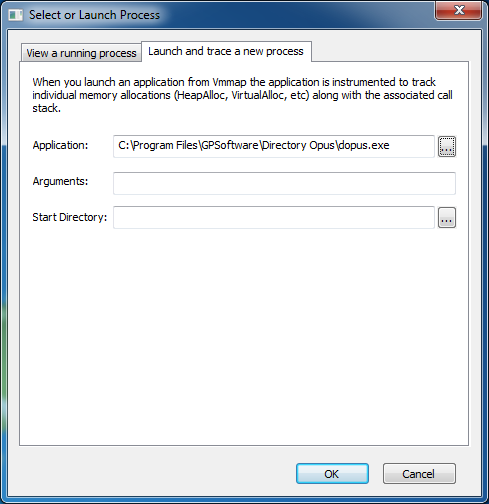
- Before you click OK you need to exit Directory Opus (dopus.exe) so that it can be re-started by VMMap. (This will allow VMMap to keep a record of the memory allocations made by the new dopus.exe.)
Simply closing all Opus windows will not exit it by default. Use the Exit option on Opus's tray-icon menu. (See also: How to Exit Directory Opus.)
- Now click OK in VMMap; it should re-start Opus.
VMMap will also display a colourful list of numbers but don't worry about understanding them. :)
Keep VMMap and Opus running; do not close either of them from now on.
- Use Directory Opus in a way which triggers your memory leak.
Ideally, trigger the leak several times so it is large and easy to find. (Make it leak at least 10MB, or more if you can, so it stands out from other memory allocations.)
Use the standard Task Manager to keep an eye on dopus.exe's memory usage so you can tell when you've triggered the leak.
- Return to VMMap and push F5 (or click View -> Refresh) to make it refresh.
- Click Trace... at the bottom of the VMMap window:

- In the Trace window which appears, sort by the Bytes column and scroll to the top of the list.
It should look something like this where the first item has a much larger Bytes value than the others:
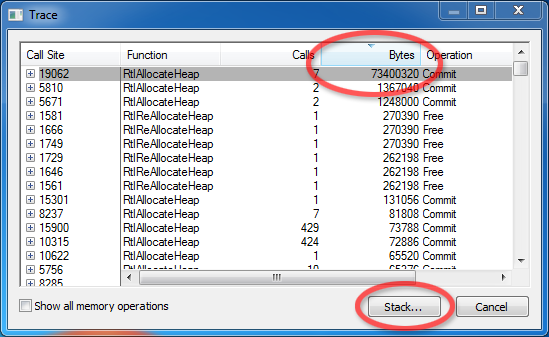
If the first item doesn't have a relatively large Bytes value then you may need to trigger the leak more times (keep VMMap running and remember to Refresh it each time you come back to it), or you may be incorrect about there being a leak at all. Otherwise, continue...
- Select the first item and then click Stack... at the bottom of the Trace window.
- You will now see a list of DLLs (and dopus.exe) involved when the memory was allocated, like this:
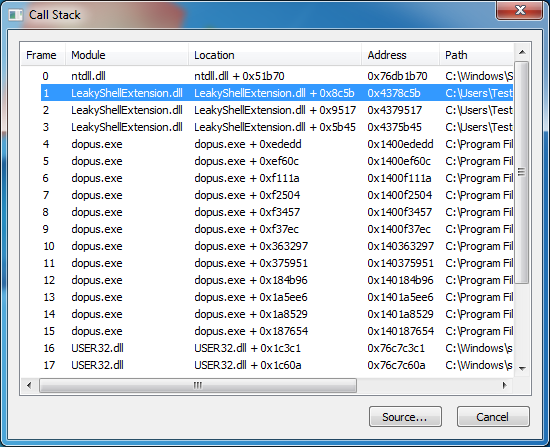
The component causing the memory leak is usually the first non-Windows DLL in the list. You can usually ignore the ones whose paths start with C:\Windows (e.g. ntdll.dll and user32.dll).
In the example above, the memory leak was caused by LeakyShellExtension.dll which, as you can guess, is a shell extension I wrote for this guide which intentionally leaks memory. I wrote it to leak about 10MB each time a file was right-clicked and then right-clicked files a few times to make it leak about 70MB in total.
- Once you have a suspicious DLL the name and path are often enough to identify what it belongs to. If not, find the DLL on disk, right-click it, select Properties and then go to the Details tab. That will usually contain information about who made it and what it's a part of.
Sometimes it's worth looking at some of the other DLLs in the list, too.
Once you know what the DLL belongs to you can try uninstalling (or updating) it to see if the leak goes away.
If the leak goes away then you know who to report the bug to.
If the leak remains, repeat the process and see which DLLs are indicated. If it's the same DLL again then you know that you didn't successfully uninstall it. If it's another DLL, maybe the first one was innocent and can be reinstalled.
A new plugin has been released which gives Directory Opus the ability to display thumbnails of Adobe Illustrator (.ai) and EPS files.
This is a third-party plugin made by Ardfry Imaging and it requires their PSD Codec to work.
(While the plugin itself is free, the codec it depends on is US$19.95. There is a trial version so you can test it out. It also adds AI, EPS and Photoshop (PSD) thumbnails to Explorer, File-Open dialogs, etc. If you're wondering why it doesn't add PSD thumbnails to Opus as well it's just because Opus already understands PSD by itself.)
The plugin supports both 32-bit and 64-bit versions of Opus and Windows Vista/7. (The plugin doesn't support Windows XP.)
Head over to Ardfry's page for more information, download links, and some screenshots:
http://www.ardfry.com/psd-codec/view-eps-ai-thumbnails-in-Directory-Opus.html
It's great to see this plugin as I know several people on the Opus forum have requested something like it. Thanks to Ardfry!
Directory Opus version 9.5.6.0 - October 14th 2010
A free update for all registered Directory Opus 9 users is now available for download from GP Software.
Direct Downloads:
Directory Opus x86 (32 bit)
Directory Opus x64 (64 bit)
Bugs fixed / minor changes:
- Fixed crash that could occur if the Set SORTBY function was called with a column that wasn't currently displayed.
- Drag & drop of attachments from Outlook to a folder tab now works correctly.
- Fixed problem with slide-out back/forwards buttons where they would not notice the mouse was no longer over them if the mouse moved during the slide animation.
- Fixed the Go command's OPENINDEST argument so that it will use an existing destination Lister if the current Lister is not a dual-display one.
- Fix for the 'Open in Directory Opus' folder context menu item not working in Windows 7 if Explorer Replacement mode was disabled in some cases. This also fixes the 'Open folder to view files in Directory Opus' AutoPlay option if Explorer Replacement mode disabled.
- Fixed crash when using the Print Folder command without any printers installed (or with print service disabled).
- Fixed problem that prevented custom Folder Colors from working reliably in the tree.
- If two or more files on an FTP site were selected and 'Open' chosen from the context menu, they would in some cases be downloaded and opened multiple times.
- New FTP Proxy for USER: user@proxy_user@host and PASS: password@proxy_password
- Fix for FTP sites that claim to support UTF-8 but return non-UTF-8 encoded directory listings.
There is now a @Directory_Opus account on Twitter for those who prefer to get updates that way.
This is an Opus Beta release only. If you aren't comfortable running the very latest version of Opus then you may like to wait for the next stable/public release.
To download the new beta version, visit the Directory Opus 9.5.5.2 thread.
Bugs fixed / minor changes:
- Fixed crash that could occur if the Set SORTBY function was called with a column that wasn't currently displayed.
- Drag & drop of attachments from Outlook to a folder tab now works correctly.
- Fixed problem with slide-out back/forwards buttons where they would not notice the mouse was no longer over them if the mouse moved during the slide animation.
- Fixed the Go command's OPENINDEST argument so that it will use an existing destination Lister if the current Lister is not a dual-display one.
- If two or more files on an FTP site were selected and 'Open' chosen from the context menu, they would in some cases be downloaded and opened multiple times.
- New FTP Proxy for USER: user@proxy_user@host and PASS: password@proxy_password.
Quick View Plus (QVP) is a product which can view hundreds of file formats without the need for any additional software. For example, it can display Microsoft Word or Corel Word Perfect documents without having either program installed.
Quick View Plus 11 includes a preview handler that works within Directory Opus (and newer versions of Windows Explorer and Outlook).
Simply installing Quick View Plus 11 Standard (or above) will add its viewing abilities to Directory Opus if you are on Windows Vista, Windows 7 or above.
Notes & Caveats (correct at the time of writing, September 2010):
- Windows XP: Quick View Plus 11 does not install its preview handler on Windows XP, although it may do if you have Outlook 2007 installed (this has not been tested).
- 64-bit: Avantstar, who make Quick View Plus, do not officially support using it on 64-bit versions of Windows; however, from brief testing it appears to work fine.
- QVP editions: Quick View Plus 11 comes in two editions: Standard and Professional. The Standard edition is all you need if you just wish to view files within Directory Opus.
- QVP Trial version: The current Quick View Plus trial version does not correctly install its preview handler, meaning it will not work within Directory Opus. Avantstar are aware and will hopefully fix this in the future. The problem does not affect the full version of Quick View Plus. You can still use the trial version's standalone QVP application to test how well it views certain files.
(Thanks to Michael Kenward, Jon Potter and Avantstar themselves for their help discovering the info above. Thanks also to Ron Hirsch whose quest for a way to view Word Perfect files in 64-bit Opus led us here.)
This is an Opus Beta release only. If you aren't comfortable running the very latest version of Opus then you may like to wait for the next stable/public release.
To download the new beta version, visit the Directory Opus 9.5.5.1 thread.
Bugs fixed / minor changes:
- Fix for the 'Open in Directory Opus' folder context menu item not working in Windows 7 if Explorer Replacement mode was disabled in some cases. This also fixes the 'Open folder to view files in Directory Opus' AutoPlay option if Explorer Replacement mode disabled.
- Fixed crash when using the Print Folder command without any printers installed (or with print service disabled).
- Fixed problem that prevented custom Folder Colors from working reliably in the tree.
- Fix for FTP sites that claim to support UTF-8 but return non-UTF-8 encoded directory listings.
|
